
An AI tutor that teaches thinking, not prompting
Timeline
April – May 2026
The Brief
AI-powered EdTech App (Desktop)
Client
Apprenticeship Project
for ExpTD
My Role
UX Lead
Consultant
(6 member team)
The Problem
Everyone uses AI. Almost everyone has quietly made peace with it failing them. Not for simple question-answer tasks ofcourse but for complex tasks when AI is truly needed.
Our research across 9 interviews and 69 survey respondents confirmed it:
93% of users experience AI failure regularly. But when we asked why — silence. They had no language for what was going wrong
and most blamed the tool and looked for a more powerful LLM.
The insight that shaped everything: bad prompts aren't a writing problem. They're a thinking problem.
But here's what made this genuinely hard to design: thinking is invisible. You can't see someone doing it well. You can only see the output. Every decision we made in this product was an attempt to solve that.
The answer wasn't a tool. It was a curriculum.

The tempting solution was a prompt library — collect the best prompts, organise by use case, let people copy-paste. Fast to build. Completely wrong. A template teaches you the answer. It doesn't teach you to think.
Therefore: 7 levels. Designed to be finished. Each one building a specific cognitive capability that works on any AI, on any task, long after you stop using the product.
How do you practice something invisible?
You design a session structure that forces the thinking into the open — before, during, and after the prompt is written.
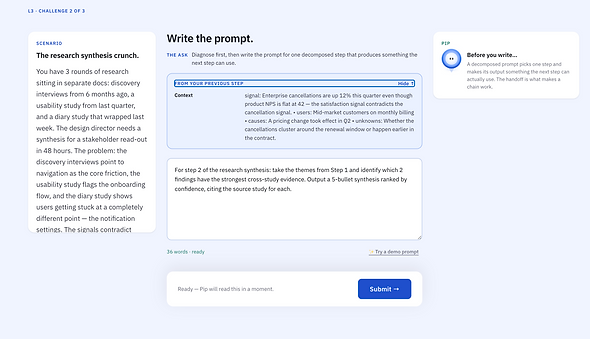
Every session follows one scenario and three challenges in a fixed sequence. The order mirrors how skilled AI users actually think: diagnose the problem first, then write, then judge whether it worked.
(Example session in Level 3)

Challenge 1 — Diagnose first
Most AI failures happen before anyone types anything. The user hasn't framed what they actually need. This challenge makes that thinking visible and mandatory.
Challenge 2 — Write the prompt
The diagnosis from Challenge 1 becomes the brief. The user can't skip the thinking and go straight to typing — the architecture won't let them.

Challenge 3 — Evaluate the output
At Level 3 and above, the AI output you're judging is the direct response to the prompt you wrote in Challenge 2. Your own thinking is on trial — not a generic example.
Same skill. Ten different ways to break it.
Repeating the same task on loop doesn't build skill — it builds speed at one task. Real capability comes from practising the same underlying thinking from different cognitive angles.
So we designed 10 challenge types. Not 10 topics. 10 modes — each one isolating a different way prompting thinking breaks down. The same scenario at Level 1 and Level 6 uses the same challenge type. The level is what changes the difficulty — not the format

The hardest design problem: feedback that teaches, not scores.
Once we had a session structure and challenge types, we hit the sharpest design problem in the whole product: how do you give feedback on thinking? A score of 42/100 tells you nothing. You don't know what broke. You don't know what to fix. You just feel bad and try again with no new information.
Pip — our AI evaluation guide — names the failure instead of measuring it. Not "low score on Context." But: "When stakeholders disagree on the definition of done, the AI can't resolve that — your prompt needs to pick a lane." That's the difference between feedback that frustrates and feedback that actually changes how you think next time.

Specific feedback to user's responses


Simply put, the feedback had to feel like a coach — not a judge.
We didn't build streaks. Here's what we built instead.
Duolingo's gamification is brilliant — for Duolingo's goal. Their goal is daily active users. Our goal is that you write a better prompt in your job tomorrow, without opening the app. Those require completely different mechanics.
One test applied to everything: does this reward the quality of thinking, or just the act of showing up? If it rewarded showing up — we cut it.
Thinking Points accumulate only when your score improves, not just when you submit. Thinking Momentum tracks quality across your last 5 sessions, not your login streak. Pattern Badges are earned by demonstrating a specific cognitive capability — not by completing volume.


Prototype
In 4 weeks: a 7-level end-to-end interactive prototype, 5 design documents, a full evaluation engine, and a handover brief ready for development.
Every level, every session state, every feedback interaction — fully clickable. Try it below.

Landing Page
Lesson Session


Dashboard (Dark mode)
Pip Feedback

What designing for thinking actually taught me.
This was the most intellectually demanding project I've worked on — not because the UI was complex, but because the product's entire job was to change how someone thinks. You can't fake that with smooth animations or a well-designed empty state.
The thing that kept catching us: we'd design something that felt encouraging, and it would quietly undermine the learning. Pip had to be warm, but not so warm it let bad thinking slide. The progression had to feel earned, but not punishing. Every single decision lived in that tension between feels good and actually works.
The strange part: I was building a product about AI prompting while prompting AI to help build it. Every design decision I made in Prompt Tutor, I was simultaneously making as a user. That tension kept me more honest than any design critique would have.
It turns out the best way to design a product that teaches thinking is to think very carefully — out loud, with evidence — about every decision you make.